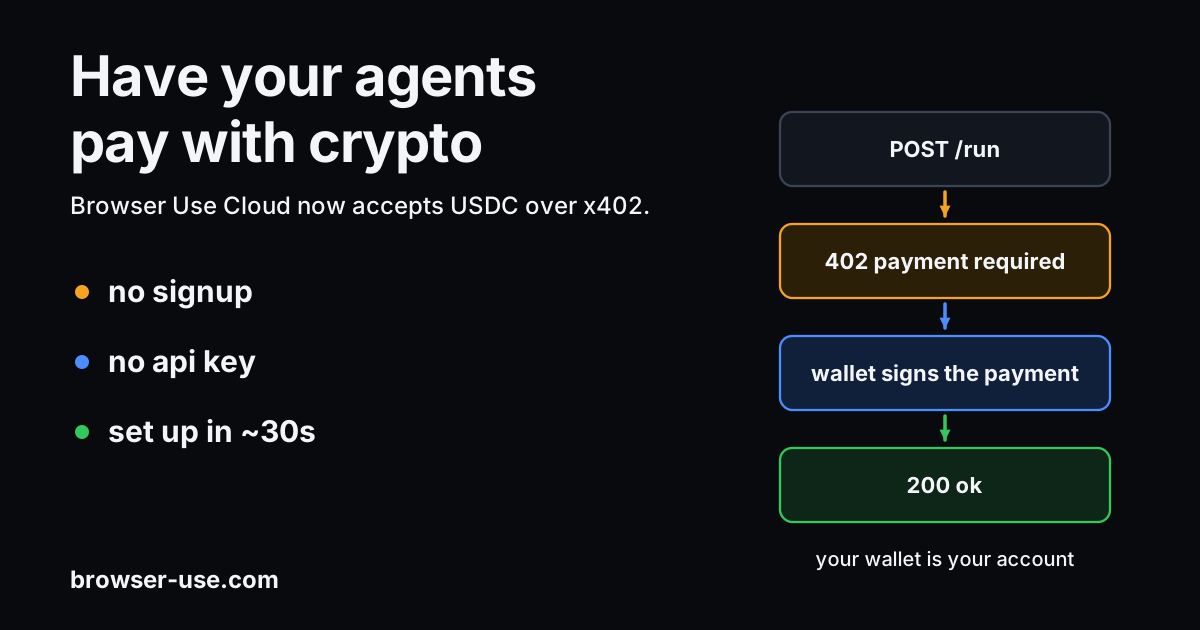
Browser Use Cloud now supports x402, a protocol from Coinbase where, instead of presenting an API key, your AI agent can pay for each API request.
You don't need to sign up, provide a credit card, or generate an API key. Your crypto wallet is your account.
Setup takes about a minute. Paste our docs into any coding agent — Claude Code, Codex, Cursor — and it walks you through the rest: setting up a USDC wallet, installing the SDK, and making the first payment. For Claude Code, we have a skill that runs the entire setup.
USDC is a stablecoin pegged 1:1 to the US dollar. One USDC is worth one US dollar.
Why we built this
Agents need money. Until x402, every API expected a human to sign up, enter their billing information, and paste their API key into the agent's environment.
With x402, an agent can pay for its own tasks and top up its credits.
Kevin Leffew, x402 co-author and AI GTM Lead at Coinbase Developer Platform, sees browser access as part of a larger shift:
“Browser Use is turning browser automation into an open, on-demand service that any agent can access with x402. As the web evolves from being UX-driven to increasingly headless, agents need more tools to complete tasks. Browser automation is a big step for them to be able to navigate and interact with the web to do that.”
— Kevin Leffew, x402 co-author & AI GTM Lead, Coinbase Developer Platform
In practice, an agent can find Browser Use, pay from its own wallet, and open a browser without waiting for someone to create an account or copy a key.
How it works
Your agent runs a task. When it needs to pay, it pulls a few dollars of USDC from your wallet and turns them into Browser Use credits. When those credits run out, it pulls a bit more.
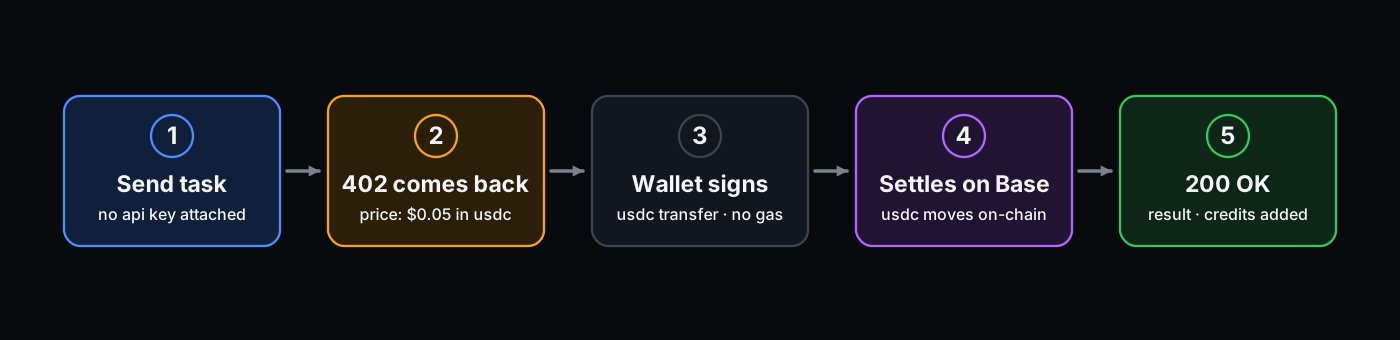
You can control this yourself from code, or hand it to a coding agent and let it set the whole thing up for you.
Set up in your coding agent within 30 seconds
Claude Code. Claude does the wallet setup, funding walkthrough, and verification for you:
npx skills add https://github.com/browser-use/browser-use --skill x402Then, /x402 in Claude Code. It generates (or imports) a wallet, walks you through funding it via Coinbase, writes the key to your .env, installs the SDK, and runs a task to test it.
SDK. One line in Python or TypeScript:
from browser_use_sdk.v3 import AsyncBrowserUse

client = AsyncBrowserUse(x402_private_key="0x...")  # USDC on Base
result = await client.run("Go to example.com and tell me the heading.")
import { BrowserUse } from "browser-use-sdk/v3";
const client = new BrowserUse({ x402PrivateKey: "0x..." });
const result = await client.run("Go to example.com and tell me the heading.");Agent wallets. Give your agent its own wallet. AgentCash keeps a wallet on your machine and gives coding agents tools to discover and pay x402 APIs. Coinbase's Agentic Wallet is a hosted wallet you sign into with your email and fund with Apple Pay you can then use via CLI or MCP:
# Coinbase Agentic Wallet
npx awal x402 pay https://x402.api.browser-use.com/api/v3/sessions \
  -X POST -d '{"task": "Go to example.com and tell me the page title"}' \
  --max-amount 5000000 --json
Two ways to use it
Wallet only (the default). Pass just your wallet's private key. The first time your wallet pays, we automatically create a Browser Use account for it, and the wallet becomes your identity.
Top up an existing Browser Use account. If you already have an API key (for example, one created via browser-use cloud signup or the dashboard), pass both that API key and your wallet's key. This will add the credit to your existing account instead of making a new, wallet-keyed one. Useful when:
- You'd rather add credit with crypto than a credit card
- Several wallets are paying into one shared account
client = AsyncBrowserUse(
    api_key="bu_...",          # existing account to top up
    x402_private_key="0x...",  # wallet that pays
    base_url="https://x402.api.browser-use.com/api/v3",
)
How agents find us on their own
The Bazaar is Coinbase's public list of APIs that accept x402. Agents can search it by what an API does, what it costs, and how well it's trusted.
A human doesn't have to find Browser Use and hand the agent a key. The agent can find us on its own and start paying.